The Outreach Sequence
Choose how outreach runs — email, LinkedIn, or both — then review every message Rose writes before anything sends.
The outreach sequence is the series of steps Rose sends each candidate. You decide its shape — which channels, in what order, with what gaps — and Rose writes the messages, personalised for every candidate.
Step 1 — Shape the sequence
Before Rose writes a word, she asks How should the outreach run? with a small builder. It opens on the project's current sequence, so if you're happy with it you can confirm straight away.
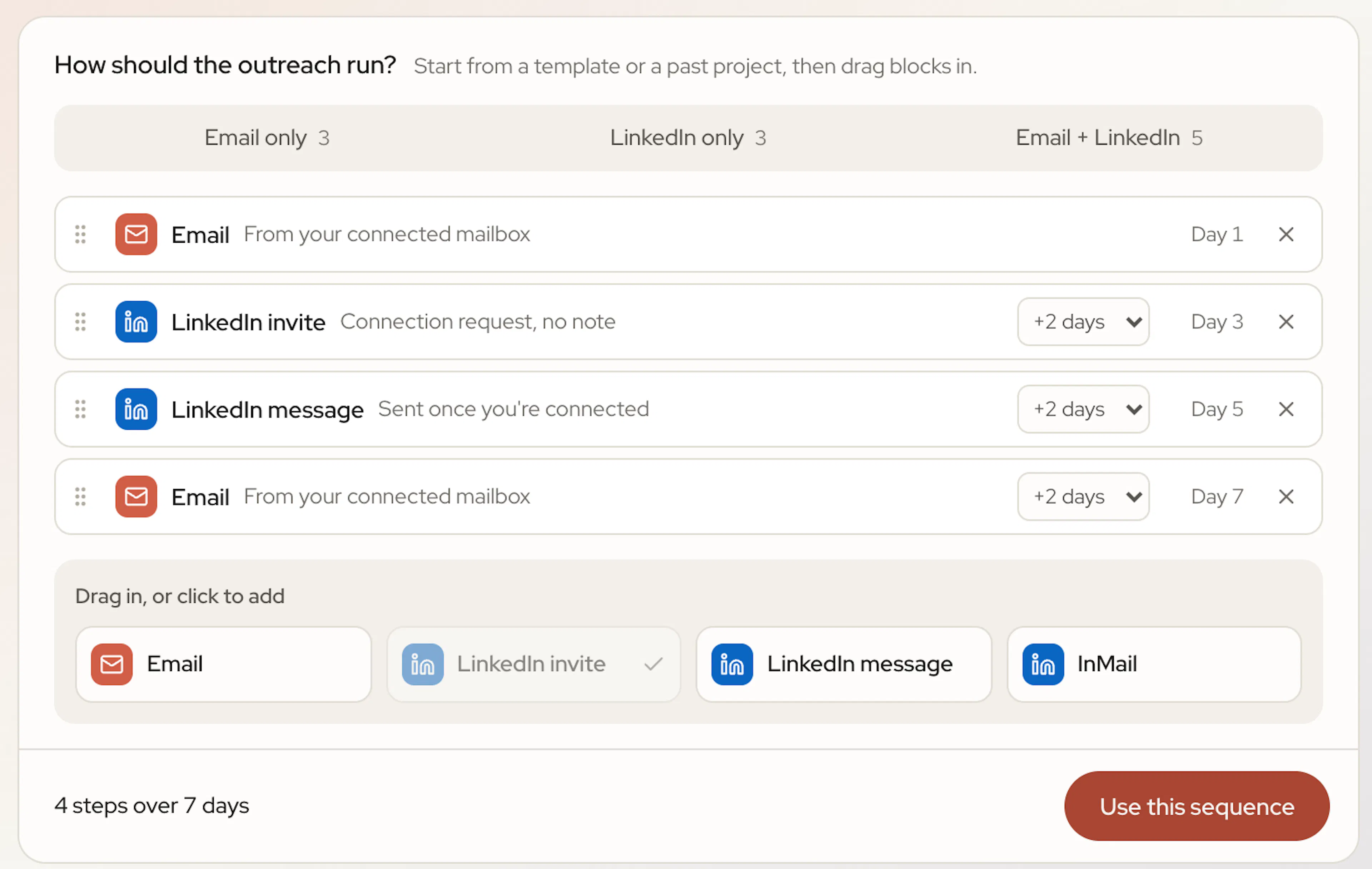
Start from a template
| Template | What it does |
|---|---|
| Email only | Three emails, spaced out. No LinkedIn. |
| LinkedIn only | An invite, a message once they accept, then an InMail. |
| Email + LinkedIn | An invite and a message on LinkedIn, then three emails. |
Each tab shows how many steps the template has. If you've run projects before, a From a project tab lets you reuse the shape of a sequence you've already used. It copies the steps and wait times — Rose still writes fresh messages for the new role.
Adjust the steps
Drag blocks in from the tray (Drag in, or click to add), reorder them, remove them, and change the wait before each one.
| Block | What it sends |
|---|---|
| An email from your connected mailbox | |
| LinkedIn invite | A connection request, with no note |
| LinkedIn message | A direct message, sent once you're connected |
| InMail | Reaches anyone, uses your InMail credits |
Rose suggests what to add next — for example, a follow-up email for people who don't accept your invite. A few rules keep sequences sensible:
- Only one LinkedIn invite can go out per person.
- A LinkedIn message needs an invite before it. Anyone you aren't connected with gets an InMail instead.
- A sequence has a minimum and a maximum number of steps; the builder tells you if you're outside them.
When it looks right, click Use this sequence. The card shows Sequence set.
LinkedIn steps send from your own LinkedIn account. Connect it on the Integrations page first — Rose will prompt you if you haven't.
Step 2 — Review the messages
Rose then writes every step and shows you the sequence one tab per step. Open each step before approving — you can edit any subject or body inline, or click Ask Rose to edit and tell her what to change.
- Tokens such as the candidate's first name are personalised by Rose for every recipient.
- Highlighted phrases may hurt deliverability. Remove them yourself, or use Fix all with Rose. When you're clear you'll see Spam check · you're in the clear.
When every step looks right, click Approve.
Avoid hype (“revolutionary”, “once-in-a-lifetime”) and pressure (“last chance”, “urgent”). They land in spam and depress reply rates.
The Outreach tab
Everything you approved lives on the project's Outreach tab, where you can review and edit the steps before launch.
The Sending schedule sets the days, hours and timezone emails can go out. Rose paces sends gradually and pauses automatically if emails start bouncing. Changes to the schedule apply to a live project immediately.
Rose stops a candidate's sequence as soon as they reply.